


Highlights#
- Built an asynchronous websocket server (Python asyncio, Socket.IO) that analyzed live patient exercise video and returned feedback in real time.
- Fixed a throughput bottleneck (per-frame TensorFlow inference could not keep up) by caching frames in Redis and analyzing time windows instead.
- Operated the GPU-equipped Linux server that carried the TensorFlow workload, with session activity recorded to MongoDB.
How it works#
flowchart LR
    A[Mobile app camera frames] --> B[Socket.IO / asyncio ingest]
    B --> C[Redis frame window]
    C --> D[Time-based pattern matching]
    D --> E[TensorFlow model on GPU server]
    E --> F[Results back over the socket]
    E --> G[(MongoDB session log)]
Case Study#
Problem. Breathment is a digital physiotherapy product built at the TUM Incubator. Patients do breathing and movement exercises in front of a camera, and the feedback has to arrive while they are still exercising, not after. Someone had to turn a live stream of frames into movement analysis fast enough for that to work.
Approach. I built the server in Python with asyncio and Socket.IO. The obvious design, TensorFlow inference on every incoming frame, could not keep up. So I cached frames in Redis and ran the analysis over windows of cached frames instead, which turned out to fit the problem better anyway: the time-based pattern matching needed sequences of movement, not single frames. The heavy computation ran on a GPU-equipped Linux server that I also managed, and each session was logged to MongoDB.
Outcome. The pipeline ran live inside the Breathment product while real patients used it. The app around it was a team product; the real-time server was mine, and of everything I built in that period it’s the piece I’m proudest of.
Vital-sign monitoring (rPPG)#
Estimates a patient’s heart rate and breathing rate from ordinary video, so vitals show up in the Breathment app without any wearable.
Highlights#
As part of a Breathment-TUM team:
- Brought contactless vitals into the Breathment patient app: heart and breathing rate estimated from plain video via rPPG, no wearable required.
- Adapted the published MTTS-CAN rPPG model and stabilized its noisy raw output with a bandpass filter, Hilbert transform, and Welch’s method for the final rate estimate.
- Served inference from a FastAPI service (TensorFlow, OpenCV), with an Angular panel for physiotherapists to visualize signals and tune parameters.
How it works#
flowchart LR
    V[Patient video] --> F[FastAPI service]
    F --> M[MTTS-CAN model
TensorFlow + OpenCV]
    M --> B[Bandpass filter
+ Hilbert transform]
    B --> W[Welch's method
rate estimation]
    W --> A[Angular interface
for physiotherapists]
    W --> R[React Native app
patient vitals]
Case Study#
Problem. Breathment guides patients through breathing exercises remotely, and vitals are the obvious signal to track alongside them. Getting heart and breathing rate normally means a wearable or extra device, which most patients at home simply do not have. We wanted those numbers from the one sensor everyone owns, a camera.
Approach. Rather than train a model from scratch, we started from MTTS-CAN, a published multi-task temporal-shift attention network for rPPG, and adapted it to our setting. The raw per-frame output is too noisy to show a patient directly, and making it usable was the real work: the signal goes through a bandpass filter and a Hilbert transform, with Welch’s method producing the final heart and breathing rate. The whole pipeline sits behind a FastAPI service using TensorFlow and OpenCV, and an Angular interface exposes the signals and configurable parameters to physiotherapists.
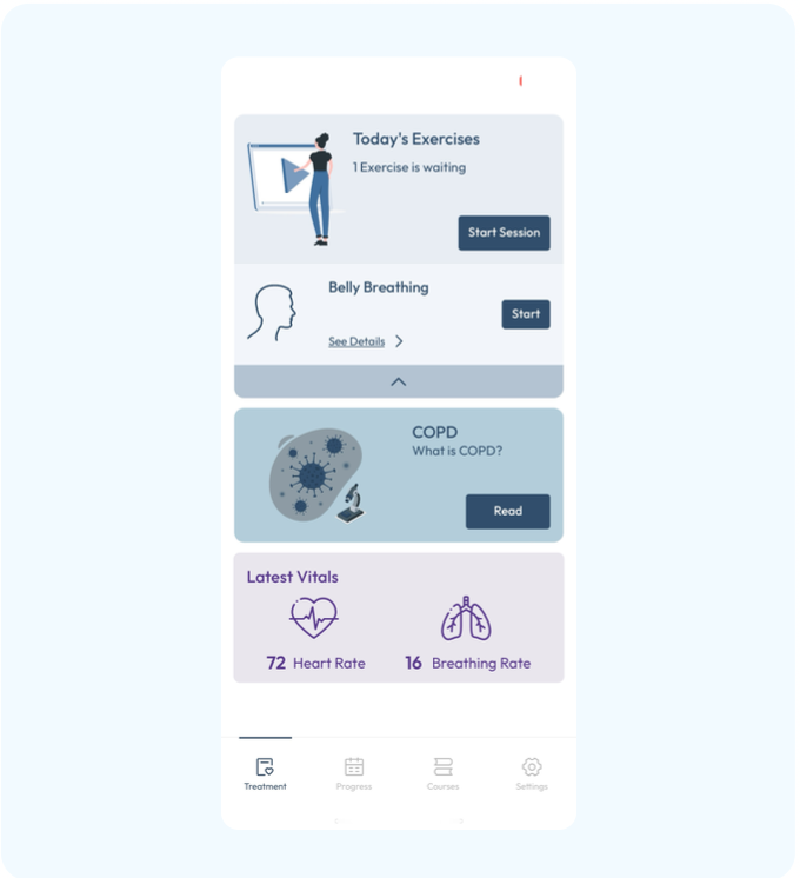
Outcome. The pipeline was integrated into the patient-facing app, which displayed its readings — 72 bpm heart rate and 16 breaths per minute in the screenshot above — next to the day’s exercises.
Production operations#
Asynchronous Graylog logging and custom dashboards for Breathment’s FastAPI backend, tracking patient exercise activity and showing the team where the API was failing.
Highlights#
- Established the logging infrastructure for Breathment’s FastAPI backend on Graylog, using asyncio queue handlers so log writes never blocked patient-facing request handling.
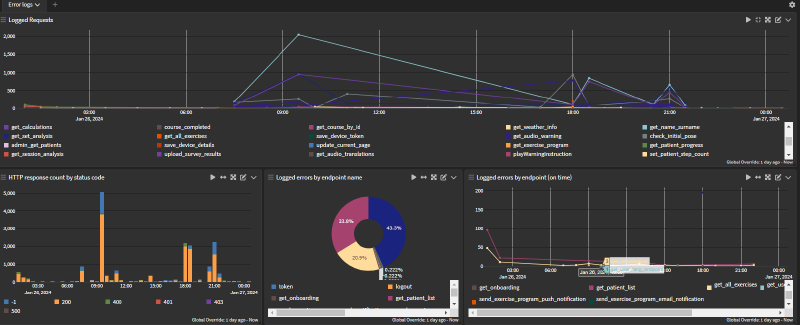
- Built custom Graylog dashboards covering roughly 20 API endpoints, with traffic peaks around 2k requests on the busiest ones in the January 2024 snapshot.
- Surfaced production failure patterns through per-endpoint error dashboards, identifying auth/token errors as roughly 43% of all logged errors.
How it works#
flowchart LR
    P[Patients and healthcare professionals] --> API[FastAPI backend]
    API --> Q[asyncio log queue]
    Q --> H[Queue handler]
    H --> G[Graylog]
    G --> T[Traffic per endpoint]
    G --> S[Status-code counts]
    G --> E[Errors by endpoint]
Case Study#
Problem. Breathment had real patients doing their exercises through the product, with a separate interface for healthcare professionals. The team needed two things from the same data: a record of patient activity, and a monitoring view of how the API was actually behaving in production.
Approach. I set up Graylog with custom dashboards, fed directly by the FastAPI backend. The main design decision was making logging asynchronous. Log records go through asyncio queue handlers, so a slow write to Graylog never holds up a patient request. On the dashboard side, traffic is broken down per endpoint (get_exercise_program, get_patient_progress, get_session_analysis, among others). A second set of panels counts responses by status code and charts logged errors per endpoint over time.
Outcome. In the January 2024 snapshot, the busiest endpoints show traffic peaks of roughly 2k requests, and auth/token errors account for about 43% of logged errors.
Stack#
Real-time server. Python (asyncio), Socket.IO, Redis, TensorFlow, MongoDB, Linux GPU server.
Vital-sign monitoring. Python, TensorFlow, OpenCV, FastAPI, Angular, React Native.
Production operations. Python, FastAPI, asyncio, Graylog.